Introducing Pico

Welcome to Pico—the open-source zero-knowledge virtual machine (zkVM) that transforms how developers build secure, scalable, and high-performance decentralized applications. Drawing on the innovative “glue-and-coprocessor” architecture, Pico fuses the efficiency of specialized circuits with the adaptability of a general-purpose zkVM. This unique design empowers you to craft tailored proof systems that meet the diverse needs of modern cryptographic applications.
Pico’s design is rooted in the need for adaptable, high-performance ZK systems that can keep pace with the rapidly evolving landscape of cryptographic research. Rather than relying on a one-size-fits-all solution, Pico’s modular architecture lets you:
- Leverage Interchangeable Proving Backends: Select from multiple proving backends to achieve the best performance and efficiency.
- Integrate App-Specific Circuits: Seamlessly incorporate specialized circuits/coprocessors to accelerate domain-specific computations.
- Customize Proving Workflows: Assemble and fine-tune proof generation pipelines tailored to your application’s specific requirements.
Why Choose Pico?
Pico is built upon four fundamental strengths that set it apart:
- Modularity: Pico’s architecture is composed of independent, interchangeable components. This design allows you to configure and reassemble the system to align with your application’s requirements precisely.
- Flexibility: Pico supports various proving backends and custom proving pipelines, enabling you to fine-tune every aspect of the proof generation process. Adjust parameters effortlessly to meet specific performance demands.
- Extensibility: Designed for seamless integration, Pico allows you to incorporate app-specific circuits and custom acceleration modules. This extensibility ensures you can add bespoke coprocessors or precompiles, enhancing the system’s capabilities without disrupting its core functionality.
- Performance: Engineered for efficiency, Pico achieves industry-leading proof generation speeds on standard hardware. Its optimized workflows and specialized circuits deliver exceptional throughput and low latency, even in high-demand scenarios.
Pico provides a robust, future-ready foundation that meets today’s challenges and evolves with the advancing field of zero-knowledge technology. Whether you’re a developer eager to explore the potential of ZK proofs or a researcher pushing the boundaries of cryptographic innovation, Pico is the ideal platform to build upon.
Installation
Requirements:
Install
Option 1: Cargo install
- Install pico-cli from the GitHub repository
cargo +nightly-2025-08-04 install --git https://github.com/brevis-network/pico pico-cli
- Check the version
cargo pico --version
Option 2: Local install
- Git clone Pico-VM repository
git clone https://github.com/brevis-network/pico
- cargo install from the local path
cd sdk/cli
cargo install --locked --force --path .
Rust toolchain
Pico uses the rust-specific rust toolchain version(nightly-2025-08-04) to build the program. The specific toolchain version can be found in the rust_toolchain file in the repository root.
rustup install nightly-2025-08-04
rustup component add rust-src --toolchain nightly-2025-08-04
Install RISC-V64 target toolchain
Pico requires a RISC-V64 target toolchain to compile programs. After installing cargo pico, run:
cargo pico install
Then verify the installation:
rustup toolchain list | grep pico
You should see pico in the list.
Quick start
This page shows you how to create and prove a Fibonacci program.
Start with the Fibonacci template
- Create project
cargo pico new --template basic Fibonacci
This creates a directory Fibonacci with the basic template, which contains a fibonacci program.
- Build program
# Build program in app folder
cd app
cargo pico build
This will use the Pico compiler to generate a RISC-V ELF that can be executed by the Pico ZKVM.
- Prove program with Pico (Default Path)
# Prove in prover folder
cd ../prover
RUST_LOG=info cargo run --release
The prover subdirectory contains a Rust program that will load an input for the ELF that was just compiled, execute it, and generate a proof. This project has the entire functionality of the Pico SDK at its disposal, and can be customized however you want.
If you simply wish to use the default provided proving clients and options, you can prove using the Pico CLI via
RUST_LOG=info cargo pico prove --input "0x6400000000000000" --fast --elf /path/to/elf # input n = 100
The input to the fibonacci program is a single u64 specifying which number to compute, so we can directly pass the input with the --input option, supplying little endian bytes. --fast simply tells the prover to skip any recursion steps and terminate after finishing the RISC-V proof.
- Prove program with AOT (Experimental)
AOT is an alternative execution path: the emulator thread can be driven by AOT-compiled chunks generated from the specific guest ELF you are proving, instead of the interpreter. This trades a one-time codegen step for reduced per-proof execution cost.
- One-Time setup
Install the AOT codegen binary:
cargo +nightly-2025-08-04 install \
  --git https://github.com/brevis-network/pico \
  --tag v2.1.1 \
  pico-aot-codegen
- Generate AOT chunks
The generated chunks are tied to the PC ranges of a specific ELF. You must re-generate whenever app/src/ changes.
From the project root, after cargo pico build:
PICO_AOT_RUNTIME_SPEC='git = "https://github.com/brevis-network/pico", tag = "v2.1.1"' \
  generate_crates app/elf/riscv64im-pico-zkvm-elf ./aot-generated
PICO_AOT_RUNTIME_SPEC tells the codegen tool to wire pico-aot-runtime as a git dep in the generated chunk crates, so aot-generated/ works at the template root without requiring a local Pico checkout.
- Prove with
--aot
Enable the template’s aot feature and pass the --aot runtime flag:
cd prover
RUST_LOG=info cargo run --release --features aot -- --aot
Project Layout
Fibonacci
|—— app
     |—— elf
          |—— riscv64im-pico-zkvm-elf
     |—— src
          |—— main.rs
     |—— Cargo.toml
|—— lib
     |—— src
          |—— lib.rs
     |—— Cargo.toml
|—— prover
     |—— src
           |—— main.rs
     |—— Cargo.toml
|—— Cargo.toml
|—— Cargo.lock
|—— rust-toolchain
The template project includes 3 workspace members: app, lib and prover
app: contains the program source code, which will be compiled to RiscV
app/elf: contains ELF with RISC-V instructions.
lib: contains components or utilities shared in multiple modules.
prover: contains the scripts to prepare program input data and execute the proving process.
Start with the EVM template
Minimum memory requirement: 32GB
-
Create and build the EVM Example Project
cargo pico new evm-example --template evm
cd evm-example/app/
cargo pico build
This uses the
evmtemplate, which will set up a proving script that will generate a Groth16 proof suitable for verification via smart contract on an ETH compatible chain. -
Prove program to EVM
cd ../prover
RUST_LOG=info cargo run --release
This step will locally set up the Groth16 Verifier contract and generate the Pico Groth16 proof. The files will be outputted to the
root/contracts/test_datafolder.
The prover program will then attempt to launch a Docker container to generate the final EVM proof withgnark. This ingeststest_data/proof.jsonand should producetest_data/proof.data. If this file is not produced, you may need to increase the amount of RAM available to the container. -
Test EVM Proof
cd ../contracts
mv -f ./test_data/Groth16Verifier.sol ./src/Groth16Verifier.sol
forge test
The foundry test script will parse the proof generated in the previous step and interact with the Groth16 Verifier contract. With all tests passing, the EVM quick start is successful.
Programs
Pico entrypoint
The program is executed and proved with the zkVM platform. Pico links the programs by the main function annotated with the entrypoint macro_rules. The program needs to be declared with no_main.
// declare no_main
#![no_main]

// point out the main function in your program.
pico_sdk::entrypoint!(main);

pub fn main() {
    //todo: write your program logic here
}
Raw system calls are available by using pico_sdk::riscv_ecalls::* but it is recommended to use the integrated patch libraries to avoid disrupting the standard development workflow. The program can then be compiled to RiscV without creating conditional compilation-related hoops aside from the entry point (unless your system assumes a word size of 64 bits, which is untrue in the zkVM). A few light wrappers for elliptic curve types can also be found in the pico-patch-libs crate.
Be very careful with using heap memory. The currently implemented allocator does not free any memory, so cloning a medium-sized Vec a few too many times will cause your program to go OOM. You must write your own allocator if a more managed memory solution is required.
Inputs and outputs
pico_sdk::io::read_as Read a serialized input data type into the program and deserialize it into specific types, such as u32, u64, and bytes. Pico prove CLI provides two ways to pass the inputs: hex string and file path. When your specific input is a file path , the file content will be read as bytes in the program.
cargo pico prove --input "" # hex or file path
pico_sdk::io::commit Commit serializable data to the public stream. The public inputs will be compressed using a SHA256 hash and exported to the on-chain.
pico_sdk::io:commit_bytes Write the public values in a byte buffer.
Setup programs
- Create an instant program
cargo pico new --template basic basic-example
The project only contains a program module. You can test and debug your RISC-V program quickly using the basic template.
- Create a program with EVM
cargo pico new --template evm evm-example
The created project with the evm template will contain an extra Contracts folder for app and verification contracts .
- Proving with the evm option referring to this page can generate the proof for on-chain EVM.
- Verification test requires to the install foundryup and forge test.
Use the pre-prepared pico EVM proof and Groth16 verifier in the repo to run contract tests.
cd contract
forge test
Proving
Overview
Pico provides CLI and SDK tools to recursively prove the program to the developers.
Pico CLI provides a complete toolchain for compiling the RISC-V program and using Pico to complete end-to-end proof. Refer to the installation page to install the CLI toolchain. CLI default use the KoalaBear field for the backend proving, if you want to switch to other fields, read more details in Proving Backends Page.
Like the CLI, the Pico-SDK includes lower-level APIs that can prove the program directly. The prover package of the template project repository provides an example of how to import and initialize the SDK and quickly generate a RISC-V proof using the Pico SDK. In the Proving Steps Section, you can read more about VM e2e proving and the Gnark EVM proof generation for On-chain verification
Let’s quickly go through the Pico SDK usage and generate a Fibonacci RISC-V proof.
- Import
pico-sdk
# Cargo.toml
pico-sdk = { git = "https://github.com/brevis-network/pico" }
- Execute the proving process and generate RISC-V proof.
// prover/src/main.rs
fn main() {
    // Initialize logger
    init_logger();

    // Load the ELF file
    let elf = load_elf("../elf/riscv64im-pico-zkvm-elf");

    // Initialize the prover client
    let client = DefaultProverClient::new(&elf);
    // Initialize new stdin
    let mut stdin_builder = client.new_stdin_builder();

    // Set up input and generate proof
    let n = 100u64;
    stdin_builder.write(&n);

    // Generate proof
    let proof = client.prove_fast(stdin_builder).expect("Failed to generate proof");

    // Decodes public values from the proof's public value stream.
    let public_buffer = proof.pv_stream.unwrap();
    let public_values = PublicValuesStruct::abi_decode(&public_buffer, true).unwrap();

    // Verify the public values
    verify_public_values(n, &public_values);
}

/// Verifies that the computed Fibonacci values match the public values.
fn verify_public_values(n: u64, public_values: &PublicValuesStruct) {
    println!(
        "Public value n: {:?}, a: {:?}, b: {:?}",
        public_values.n, public_values.a, public_values.b
    );

    // Compute Fibonacci values locally
    let (result_a, result_b) = fibonacci(0, 1, n);

    // Assert that the computed values match the public values
    assert_eq!(result_a, public_values.a, "Mismatch in value 'a'");
    assert_eq!(result_b, public_values.b, "Mismatch in value 'b'");
}
Pico EmulatorStdin
Stdin Writer
- Pico SDK supports writing the serializable object and bytes to Pico.
#![allow(unused)]
fn main() {
/// Write a serializable struct to the buffer.
pub fn write<T: Serialize>(&mut self, data: &T);
/// Write a slice of bytes to the buffer.
pub fn write_slice(&mut self, slice: &[u8]);
}
Examples:
use std::vec;
use pico_sdk::client::SDKProverClient;
use serde::{Deserialize, Serialize};

#[derive(Serialize, Deserialize)]
pub struct FibonacciInputs {
    pub a: u64,
    pub b: u64,
    pub n: u64,
}

fn main() {
    // Initialize the prover client
    let client = SDKProverClient::new(&elf, false);
    // Initialize new stdin
    let mut stdin_builder = client.new_stdin_builder();
    // example 1: write a u64 to the VM
    let n = 100u64;
    stdin_builder.write(&n);

    // example 2: write a struct
    let inputs = FibonacciInputs { a: 0, b: 1, n };
    stdin_builder.write(&inputs);

    // example 3: write a byte array
    let bytes = vec![1, 2, 3, 4];
    stdin_builder.write_slice(&bytes);
}
- CLI input option
The prove command --input option can take a hex string or a file path. the hex string must be match the length of the read type. For example, the input n = 100u64; the hex string should be 0x6400000000000000 in little-endian format.
RUST_LOG=info cargo pico prove --input "0x6400000000000000" --fast
Read
Corresponding to the writer functions, there are read_as and read_slice tools for io reading the serializable object or bytes into the program.
SDK examples:
use pico_sdk::io::{read_as, read_vec};

#[derive(Serialize, Deserialize)]
pub struct FibonacciInputs {
    pub a: u64,
    pub b: u64,
    pub n: u64,
}

fn main() {
    // example 1: read the u64 input `n`
    let n: u64 = read_as();

    // example 2: read FibonacciInputs struct
    let inputs = read_as::<FibonacciInputs>();

    // example 3: read a byte array
    let bytes: Vec<u8> = read_vec();
}
End-to-end Proving
This section introduces more advanced CLI options and SDK APIs to complete the end-to-end proving process. The Proving process consists of multiple stages, including RISCV, RECURSION, and EVM Phases. Pico SDK includes various ProverClients in different proving backends. Here, we use the KoalaBearProverClient (based on STARK on KoalaBear) in the example code.
RISCV-Phase
Prove RISC-V programs and generate an uncompressed proof with the –fast option. The command is mainly used to test and debug the program.
CLI:
RUST_LOG cargo pico prove --fast
For example, when executing the fast proving with inputs in the Fibonacci, the input n is a u64 data received through pico::sdk::read_as, and it must be in little-endian format and filled to 8 bytes.
RUST_LOG=info cargo pico prove --input "0x6400000000000000" --fast
SDK:
#![allow(unused)]
fn main() {
// Initialize the SDK.
let client = DefaultProverClient::new(&elf);

// Initialize new stdin and write the inputs by builder.
let mut stdin_builder = client.new_stdin_builder();

// Set up input
let n = 100u64;
stdin_builder.write(&n);

let riscv_proof = client.prove_fast(stdin_builder).expect("Failed to generate proof");
}
Fast proving is implemented by using only one FRI query which drastically reduces the theoretical security bits. DO NOT USE THIS OPTION IN PRODUCTION. ATTACKERS MAY BE ABLE TO COMMIT TO INVALID TRACES.
RECURSION-Phase
CLI:
RUST_LOG cargo pico prove --field kb # kb: koalabear (default), bb:babebear
Proving without the --fast argument will execute the prover up to and including the EMBED-Phase. The resulting proof can then be verified by the Gnark proof verification circuit, which can then be verified on-chain via contract.
options:
--field
Specify the field, When without this option, default to Koalabear field.
- kb: Koalabear
- bb: Babybear
--output
You can specify the output path to generate the files prepared for the Gnark verification and default is in the project root target/pico_out/
RUST_LOG cargo pico prove --output outputs
SDK:
#![allow(unused)]
fn main() {
// Initialize the SDK.
let client = DefaultProverClient::new(&elf);
// ... write to stdin as previously described
let (riscv_proof, embed_proof) = client.prove(stdin_builder)?;
let output_dir = PathBuf::from_str(&"./outputs").expect("the output dir is invalid");

client.write_onchain_data(output, &riscv_proof, &embed_proof)?;
}
Outputs
constraints.json: The schema of the stark proof constraints is used to transform to Gnark circuit constraints.groth16_witness.json: input witnessness of Gnark circuit.
EVM-Phase
The Pico CLI provides an EVM option to generate the program Groth16 proof and verifier Contracts. You must ensure the Docker has been installed when using the evm option.
CLI:
# Setup groth16 PK/VK if its never generated or a new version update.
cargo pico prove --evm --setup
# generate groth16 proof
cargo pico prove --evm
SDK:
// Initialize the SDK.
let client = KoalaBearProveVKClient::new(&elf);
let output_dir = PathBuf::from_str(&"./outputs").expect("the output dir is invalid");
// The second argument need_setup should be true when you haven't setup groth16 pk/vk yet.
// The last argument selects the proving backend: use "kb" for KoalaBear or "bb" for BabyBear.
prover_client.prove_evm(stdin_builder, true, output_path, "kb").expect("Failed to generate evm proof");
The outputs:
proof.data: Groth16 proof generated by the Gnark Verifier Circuit.
pv_file: The public values hex string; it’s the input of Fibonacci Contract
When executing EVM proving, the Gnark Groth16 ProvingKey/VerificationKey is also generated at this step. The --setup only needs to be executed once to make sure the PK/VK is generated.
EVM Verification
The generated inputs.json format is as follows:
{
  "riscvVKey": "bytes32",
  "proof": "bytes32[]",
  "publicValues": "bytes"
}
After parsing the input data, you can call the PicoVerifier.sol as shown below:
// SPDX-License-Identifier: MIT
pragma solidity ^0.8.20;

/// @title Pico Verifier Interface
/// @author Brevis Network
/// @notice This contract is the interface for the Pico Verifier.
interface IPicoVerifier {
    /// @notice Verifies a proof with given public values and riscv verification key.
    /// @param riscvVkey The verification key for the RISC-V program.
    /// @param publicValues The public values encoded as bytes.
    /// @param proof The proof of the riscv program execution in the Pico.
    function verifyPicoProof(
        bytes32 riscvVkey,
        bytes calldata publicValues,
        uint256[8] calldata proof
    ) external view;
}
The verifyPicoProof function in PicoVerifier.sol takes a RISC-V verification key, public values, and a Pico proof, using the Groth16 verifier to validate the proof and public inputs via the pairing algorithm. For the full implementation of the PicoVerifier, please refer to the repository here.
In production, you need to verify riscvVKey and parse the public values verified by PicoVerifier. You can refer to the Fibonacci.sol example in the repository here.
Features
Logging
Pico leverages Rust’s standard logging utilities to provide detailed runtime information, particularly about performance and program statistics. You can control the verbosity of the logs via the RUST_LOG environment variable:
- Info Level: Set
RUST_LOG=infoto output overall performance data and high-level progress information. - Debug Level: Set
RUST_LOG=debugto display detailed logs, including statistics of chunks and records as they are generated and processed.
For scenarios where you want to save logs to a file without color codes (which may be embedded by default), you can pipe the output through a tool like ansi2txt. This conversion ensures that the log file remains clean and free of terminal-specific formatting, as the tracing framework does not automatically adjust colors based on environment variables.
Debugging
In the rare event that proving fails on a correctly executing binary, Pico provides additional debug capabilities to assist in pinpointing issues:
- Enhanced Debugging Features: Enable the
debuganddebug-lookupsfeatures when running the prover. These features provide extra context by outputting detailed information on individual constraints and lookup operations within each processing batch. - Minimal Memory Impact: Since debug information is generated from data already in memory for the current batch of proofs, enabling debugging does not incur a significant additional memory cost. The debug data can be discarded once the batch is processed and debugged.
- Accessing Debug Data: Combine the debugging features with
RUST_LOG=debugto capture detailed logs.
Guest VM Cycle Tracking
Please see VM Cycle Tracking for a detailed explanation of this feature.
Proving Options
Pico offers several configurable parameters to optimize the proving process for your system’s resources and performance requirements:
- Automatic Configuration: By default, Pico automatically adjusts standard options, such as chunk and batch sizes, according to the available memory on the running machine.
- Manual Overrides: Developers can fine-tune the proving process by setting the following environment variables:
CHUNK_SIZE: Determines the number of cycles executed before splitting records. This helps manage the trace size, and setting this value to a power of 2 is recommended.CHUNK_BATCH_SIZE: Specifies the number of chunks processed concurrently. Set this value based on the total available system memory and the per-record/trace memory cost, ensuring you do not exceed your system’s capacity.
These options allow you to balance performance and resource utilization, making it possible to optimize Pico for a wide range of environments—from resource-constrained setups to high-performance systems.
Features
pico-vm comes enabled with several features by default. These being strict, rayon, and nightly-features. strict is a compile time option for #![deny(warnings)] on the entire pico-vm module. rayon enables the usage of rayon’s ParallelIterator and related traits to use multithreading to speed up the proving process. This feature should be left on unless you wish to compile a single threaded prover for profiling reasons, as rayon tends to pollute the stack trace when running flamegraph. nightly-features enables certain CPU-specific performance enhancements, enabling further optimizations with -march=native and turning on AVX2 by default on x86-based architectures. AVX512 can be enabled via additional RUSTFLAGS as well. This should be left on, like rayon, unless you have a specific reason not to.
To build pico-vm without default features, simply set default-features = false in your Cargo.toml or run cargo build -p pico-vm --no-default-features for your local build environment, maybe adding --example if you want to build a specific example in addition to the Rust library.
Single threaded profiling
As mentioned in the previous section, we support single threaded builds in order to generate neater flamegraphs for profiling purposes. For example, to build test_riscv for profiling, run
cargo build -p pico-vm --no-default-features --profile --profiling --example test_riscv
to build the binary and then run
sudo flamegraph -o flamegraph.svg -- ./target/profiling/examples/test_riscv
with cargo flamegraph to produce a flamegraph that you can use to explore cost centers.
Advanced
Pico offers several advanced components that let you go beyond its default configuration. In this section, you’ll explore:
- VM Instances: The fundamental building blocks for creating custom virtual machines.
- ProverChains: Tools that enable you to compose tailored proving workflows.
- Proving Backends: A range of supported proving backends and insights on how switching between them can optimize performance.
Together, these powerful features empower you to build a customized VM that perfectly fits your application’s unique requirements.
Instances
Pico is architected as a chain of modular components, each tailored to perform a specific role in the overall ZK proof generation process. These components—known as machine instances—are instantiations of a virtual machine and comprise several submodules, including chips, compilers, emulators, and proving backends. This modular design not only simplifies the internal workflow but also provides developers with the flexibility to customize and extend the system to meet diverse application needs.
Built-in Machine Instances
The current release of Pico includes several built-in machine instances, each designed for a distinct phase of the proof generation pipeline:
RISCV
The RISCV instance is responsible for executing RISCV programs and generating the initial STARK proofs. It achieves this by:
- Execution & Chunking: Running the program and dividing it into smaller, manageable chunks.
- Parallel Proof Generation: Proving these chunks concurrently to generate a series of proofs, with the total number of proofs equaling the number of chunks.
CONVERT
Acting as the first step in the recursion process, the CONVERT instance transforms each STARK proof produced by the RISCV instance into a recursion-compatible STARK proof. This conversion is crucial for setting the stage for recursive proof composition.
COMBINE
The COMBINE instance aggregates m of recursion proofs generated from the same machine instance into a single STARK proof. By default, m is set to 2 in Pico, though it can be configured to a larger value. This instance is applied recursively to collapse a large collection of proofs into one final proof, forming a recursion tree. For example, if you start with n proofs, the first layer uses n/m COMBINE calls to produce n/m proofs; these are then aggregated in subsequent layers (n/m², n/m³, etc.) until only one proof remains. This consolidation streamlines subsequent processing and reduces overall complexity.
COMPRESS
Aiming to optimize efficiency in later recursive stage, the COMPRESS instance compresses a recursion STARK proof into a smaller-sized proof.
EMBED
As the final stage in generating a STARK proof, the EMBED instance embeds the STARK proof into the BN254 field. This prepares the proof for later conversion into an on-chain-verifiable SNARK.
Modularity and Internal Extensibility
Pico’s machine instances are designed with a strong emphasis on modularity and internal extensibility:
- Purpose-Driven Specialization: Each machine instance is engineered to execute a specific phase of the proof generation process. This targeted design enhances performance and simplifies debugging, as each instance handles a distinct, well-defined task.
- Isolated Upgradability: The self-contained nature of each machine instance allows developers to update, optimize, or replace individual components independently. This isolation promotes rapid iteration and integration of cutting-edge cryptographic techniques without disrupting the overall system.
- Flexible Submodule Architecture: Within each instance, core functionalities are implemented via interchangeable submodules (e.g., chips, compilers, emulators, proving backends). This design enables targeted enhancements, such as swapping out a proving backend to leverage a more efficient prime field, without modifying the instance’s primary function.
- Seamless Future Integration: By compartmentalizing functionalities into discrete units, Pico is primed for the adoption of new technologies. As innovative proving systems and cryptographic primitives emerge, they can be integrated into the framework without a complete overhaul, ensuring the platform evolves alongside technological advancements.
ProverChain
Pico empowers developers with the ProverChain—a feature that enables you to seamlessly chain together machine instances to create a complete, end-to-end ZK proof generation workflow. Leveraging Pico’s modular architecture, ProverChain allows you to design workflows tailored precisely to the needs of your application.
Proving Phases
Pico’s proving process is structured into distinct phases:
- RISCV-Phase: The
RISCVinstance executes a RISCV program, generating a series of initial proofs. - RECURSION-Phase: The
CONVERT,COMBINE,COMPRESS, andEMBEDinstances work together recursively to consolidate these proofs into a single STARK proof. - EVM-Phase: This final STARK proof is then fed into a Gnark prover to generate a on-chain-verifiable SNARK that is ready for deployment on EVM-based blockchains.
Default Proving Workflow
By default, Pico constructs a proving workflow by chaining the following machine instances:
RISCV → CONVERT → COMBINE → COMPRESS → EMBED → ONCHAIN (optional)
In this sequence:
- RISCV- and the RECURSION-Phase handle the initial execution and recursive proof generation. It takes a RISCV program and input and generates an embedded STARK proof.
- ONCHAIN—an optional instance—works at EVM-Phase and converts the embedded STARK proof into an EVM-verifiable SNARK.
Customizing Your Workflow
While the default workflow is designed for uniform efficiency, ProverChain offers exceptional flexibility, enabling developers to tailor the proving process to their specific requirements:
- Chain Modification: Easily add, adjust, or remove machine instances. For example, if on-chain verification is not required, you can simply omit the ONCHAIN step.
- Performance Optimization: Experiment with different configurations to achieve the optimal balance between proof size and proving efficiency. In some scenarios, accepting a slightly larger proof can lead to faster overall performance.
- Intermediate Access: The ProverChain module exposes the intermediate steps—formatted as a sequence (e.g.,
stdin -> proof -> proof -> ... -> final proof)—allowing you to fine-tune internal parameters at each stage of the workflow.
Proving Backends
One of Pico’s most innovative feature is its ability to seamlessly switch between multiple proving backends. This functionality enables you to select the optimal backend for your specific application requirements, resulting in significant efficiency gains without altering your existing proving logic.
Why Multiple Proving Backends Matter
Specialized circuits for different application features often demand advanced proving systems optimized for specific prime fields. Consider, for example, the recursive proving of a hash function like Poseidon2—a critical component in Pico’s recursive proving strategy. Although the same STARK proving system is used, working on the KoalaBear field can be much more efficient than on the BabyBear field due to the inherent properties of these fields. As a result, when a program requires extensive Poseidon2 proving, simply switching to KoalaBear can yield considerable performance improvements.
Supported Proving Backends
Currently, Pico supports generating proofs in all phases—RISCV, RECURSION, and EVM—with both STARK on KoalaBear and STARK on BabyBear. For CircleSTARK on Mersenne31, Pico currently supports the RISCV-Phase, with RECURSION and EVM phases coming soon.
- STARK on KoalaBear (prime field $$p=2^{31}-2^{24}+1$$): Supports generating proofs for
- RISCV-Phase
- RECURSION-Phase
- EVM-Phase
- STARK on BabyBear (prime field $$p=2^{31}-2^{27}+1$$): Supports generating proofs for
- RISCV-Phase
- RECURSION-Phase
- EVM-Phase
- CircleSTARK on Mersenne31 where $$p=2^{31}−1$$). Supports generating proofs for
- RISCV-Phase
- RECURSION-Phase
- EVM-Phase
Seamless Backend Switching
Switching between proving backends in Pico is designed to be straightforward. The underlying proving logic is abstracted away, allowing you to change the backend configuration through a simple parameter update—without needing to rewrite any part of your application.
The Pico SDK provides a suite of ProverClient implementations, each corresponding to a different proving backend:
- KoalaBearProverClient: Uses STARK on KoalaBear for fast proving without VK (verification key) verification.
- KoalaBearProverVKClient: Uses STARK on KoalaBear for full proving with VK verification.
- BabyBearProverClient: Similar to KoalaBearProverClient, but for STARK on BabyBear.
- BabyBearProverVKClient: Similar to KoalaBearProverVKClient, but for STARK on BabyBear.
- M31RiscvProverClient: Performs RISCV proving using CircleSTARK on Mersenne31.
We could initialize the ProverClient for different backend configurations:
// An example for initializing the different prover clients
fn main() {
    // Initialize logger.
    init_logger();

    // Load the ELF file.
    let elf = load_elf("./elf/riscv64im-pico-zkvm-elf");

    // Initialize a client for fast proving (without VK verification)
    // using STARK on KoalaBear.
    let client = KoalaBearProverClient::new(elf);

    // Initialize a client for full proving with VK verification
    // using STARK on KoalaBear.
    let client = KoalaBearProverVKClient::new(elf);

    // Initialize a client for fast proving (without VK verification)
    // using STARK on BabyBear.
    let client = BabyBearProverClient::new(elf);

    // Initialize a client for full proving with VK verification
    // using STARK on BabyBear.
    let client = BabyBearProverVKClient::new(elf);

    // Initialize a client for RISCV proving using CircleSTARK on Mersenne31.
    let client = M31RiscvProverClient::new(elf);
}
Benefits of Switchable Proving Backends
- Performance Gains: Optimize your proof generation by selecting the backend that best suits the computational demands of your workload.
- Flexibility: Experiment with different backends and configurations to achieve the ideal balance between proof size, proving efficiency, and on-chain compatibility.
- Seamless Upgrades: As new prime fields and proving systems are integrated into Pico, you can upgrade your proving backend with minimal disruption.
- Future-Proofing: Stay at the forefront of zero-knowledge technology advancements by taking advantage of the latest proving systems as they become available.
VM Cycle Tracking
The Pico emulator supports the standard VM cycle tracking protocol, but we explicitly state its operation here.
To request the VM to track cycles for you, the emulator must be started with the appropriate option set to true. You can use EmulatorOpts::with_cycle_tracker, which produces an EmulatorOpts with the appropriate field set, or by setting the cycle_tracker field within EmulatorOpts. The naming of the field is subject to change, but the function should be somewhat stable for now.
The emulator will then maintain a mapping between Request ⇒ Clock Cycle and Request ⇒ Vec<# Clock Cycle>. Every time a cycle-tracker-start: Request is encountered, the current clock is stored into the Request ⇒ Clock Cycle map, overwriting any pre-existing value. Every time a cycle-tracker-end: Request is encountered, the start clock is retrieved from the Request ⇒ Clock Cycle map, inserting the current clock if it does not exist. The difference between the current clock and the retrieved clock is added to the Request ⇒ Vec<# Clock Cycle> mapping.
Put shortly, cycle-tracker-start stores the current clock, and cycle-tracker-end will report the number of elapsed cycles since the last observed cycle-tracker-start, using itself as a fallback. It is important to know that these requests must be terminated by a newline. If a guest program writes something along the lines of println!("cycle-tracker-start: {}", req), this may result in three write syscalls. One to write the prefix, one to write the formatted req, and one to write the final newline. In order to accurately capture the entire string after cycle-tracker-start: , a newline must be received before Pico will service the request. The request is the entire string after cycle-tracker-start: or cycle-tracker-end: and before the next newline character. Note that there is exactly one space after the colon (:).
This information can then be processed on the host side by iterating through the cycle_tracker field of the returned EmulationReport. These reports are batched per chunk in the sense that you only receive the results of cycle-tracker-end for the current batch, but they will still correctly track the cycle-tracker-start from a previous batch.
Cost Estimation
The Pico emulator also provides a method for obtaining a rough estimate for the answer to the question: how many CPU cycles would it take to prove this trace? This is done by setting the EmulatorOpts::cost_estimator flag to true or by using EmulatorOpts::with_cost_estimator. This produces a value in the host_cycle_estimator field of the EmulationReport per batch, and the Vec entries of type CycleEstimator can be used to estimate the cycles on a given model. Each entry corresponds to the chunk index within the specific batch. The current model used by Pico is present in model.json, found at the root of the repository, and can be loaded with EstimatorModel::from_json(path). By using the estimator data with different models of host prover, different numbers may be obtained.
Currently, the Pico model universally divides the estimator result by 1000 as a means to avoid overflow. This is subject to change.
Function-level
Function-level coprocessors—commonly known as precompiles—are specialized circuits within Pico designed to optimize and streamline specific cryptographic operations and computational tasks. These precompiles handle operations such as elliptic curve arithmetic, hash functions, and signature verifications. In a general-purpose environment, these operations can be resource-intensive, but by offloading them to dedicated circuits, Pico significantly reduces computational costs, improves performance, and enhances scalability during proof generation and verification. Packaging these core operations into efficient, well-tested modules not only accelerates development cycles but also establishes a secure foundation for a wide range of zk-applications, including privacy-preserving transactions, rollups, and layer-2 scaling solutions.
Work Flow
Below is an example workflow of Keccak256 hash permutation precompile in Pico.
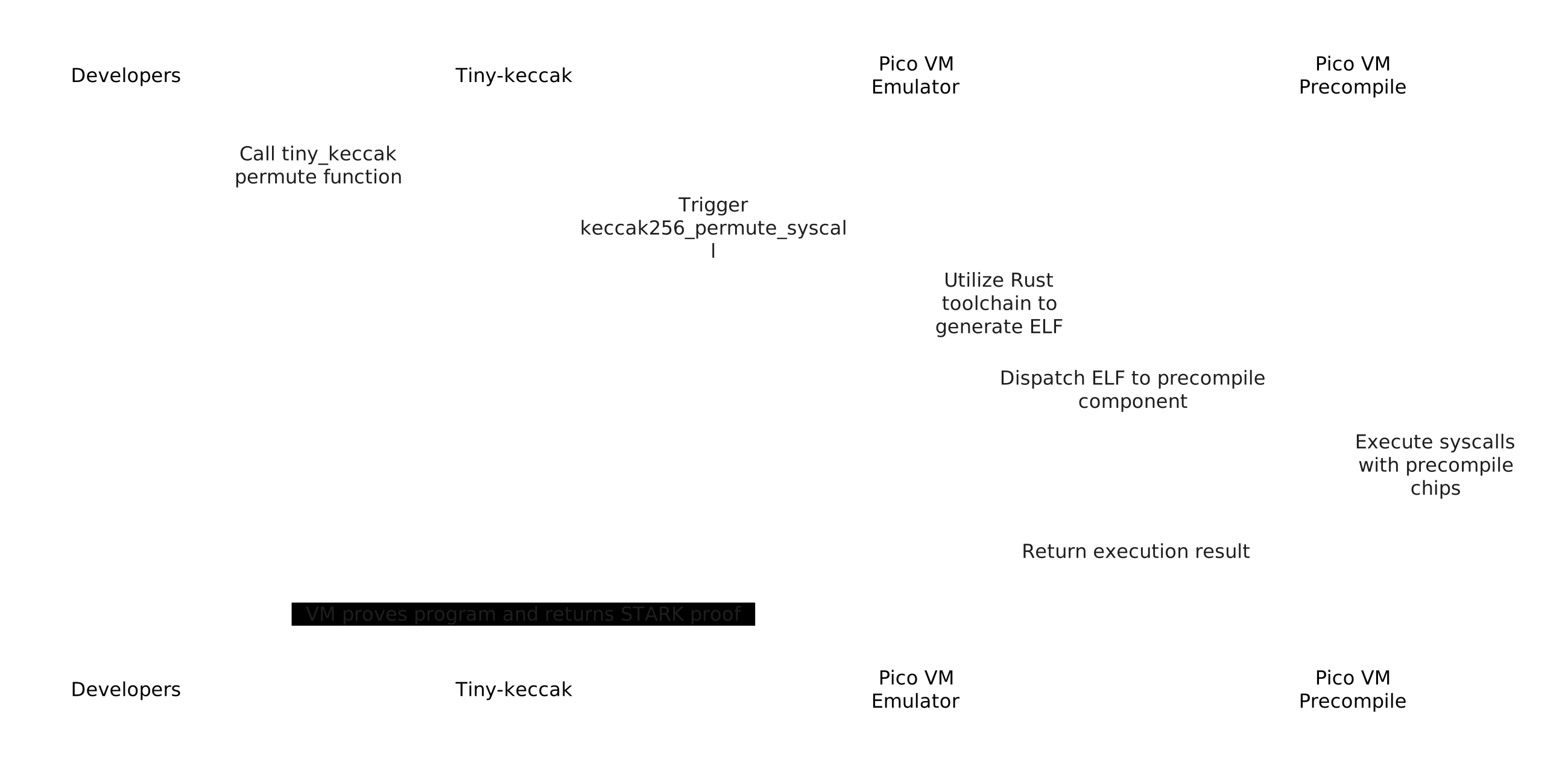
The Pico precompiles workflow involves several steps to efficiently execute and verify cryptographic operations. To illstrate how it works, we use Keccak-256 precompile as an example:
- Developer Preparation: Developers begin by writing and preparing the necessary code, including the tiny-keccak patch for cryptographic hashing functions. This library provides the core primitives needed for SHA2, SHA3, and Keccak-based operations.
- Tiny-Keccak Patch: Pico uses a forked and zero-knowledge-compatible version of tiny-keccak (sourced from the public debris repository). This patch optimizes hashing operations—particularly Keccak-256—to run efficiently within Pico.
- Keccak256 Precompile: When a Keccak-256 hashing function is invoked, Pico’s Keccak256 precompile is triggered to handle the specific permutation operations. This specialized circuit, known internally as the
keccak256_permute_syscall, is optimized for performance, minimizing overhead and improving provability. - Rust Toolchain & ELF Generation: The Rust toolchain compiles your code, including the tiny-keccak patch, into an Executable and Linkable Format (ELF) file, which is the RISC0’s support for zkVM executables.
By following this workflow, developers can perform cryptographic operations more efficiently and securely, taking full advantage of Pico’s precompile features to reduce proof overhead and streamline the development of ZK apps.
List of Syscalls
Pico is currently supporting these syscalls.
List of patches
Pico is currently supporting the following patches:
| Patch Name | Github link | branch |
|---|---|---|
| tiny-keccak | https://github.com/brevis-network/tiny-keccak | patch-v1.0.0-rv64 |
| sha2 | https://github.com/brevis-network/hashes | sha2-0.10.9-rv64 |
| sha3 | https://github.com/brevis-network/hashes | sha3-0.10.8-v1.0.0-rv64 |
| bls12381 | https://github.com/brevis-network/bls12_381 | patch-v1.0.1-rv64 |
| k256 | https://github.com/brevis-network/elliptic-curves | k256-0.13.4-rv64 |
| p256 | https://github.com/brevis-network/elliptic-curves | p256-0.13.2-rv64 |
| substate-bn | https://github.com/brevis-network/bn | patch-v1.0.1-rv64 |
Application-level
Application-level coprocessors extend far beyond individual function-level precompiles. Instead of optimizing a single cryptographic operation, these coprocessors integrate an array of specialized circuits that work together to tackle broader, domain-specific computational challenges. By incorporating application-level coprocessors, Pico not only enhances its performance but also serves as a versatile “glue” that seamlessly routes data between high-efficiency modules. This design enables Pico to be finely tuned for specific applications without sacrificing its overall flexibility and general-purpose utility—resulting in enhanced performance, improved scalability, and accelerated development cycles.
Pico can integrate a variety of exceptional coprocessors across different domains. For example:
- On-Chain Data zkCoprocessors: Engineered to provide efficient and secure access to historical blockchain data, these coprocessors enables developers to retrieve and analyze past transaction records, state data, and other on-chain information with confidence. Brevis Coprocessor has already been successfully integrated into Pico. This solution will offer a comprehensive framework for building applications that depend on verifiable, reliable on-chain data processing. Detailed integration guidelines will be available soon.
- zkML (Zero-Knowledge Machine Learning) Coprocessors : These coprocessors leverages ZK proofs to enable secure, privacy-preserving training and inference for machine learning models. It ensures that sensitive data and/or proprietary model information remain confidential throughout the process, opening the door to advanced, secure ML applications.
These application-level coprocessors empower Pico to support highly specialized, domain-specific tasks while preserving the generality and flexibility that make it a robust platform for a wide range of zero-knowledge applications.